
Contract archive
It is a comprehensive digital tool that allows contracts to be collected, described, accepted and archived in one place, with full control over document workflow and integration with DocuSign electronic signatures.

What is the Contract Archive?
Contract Archive is a dedicated document repository module that automates and organises the entire process of contract circulation in an organisation – from their entry into the system, through verification and signature, to secure archiving. It enables a full acceptance path, supervision of document status, control of authorisations and integration with the electronic signature system.
Process map:
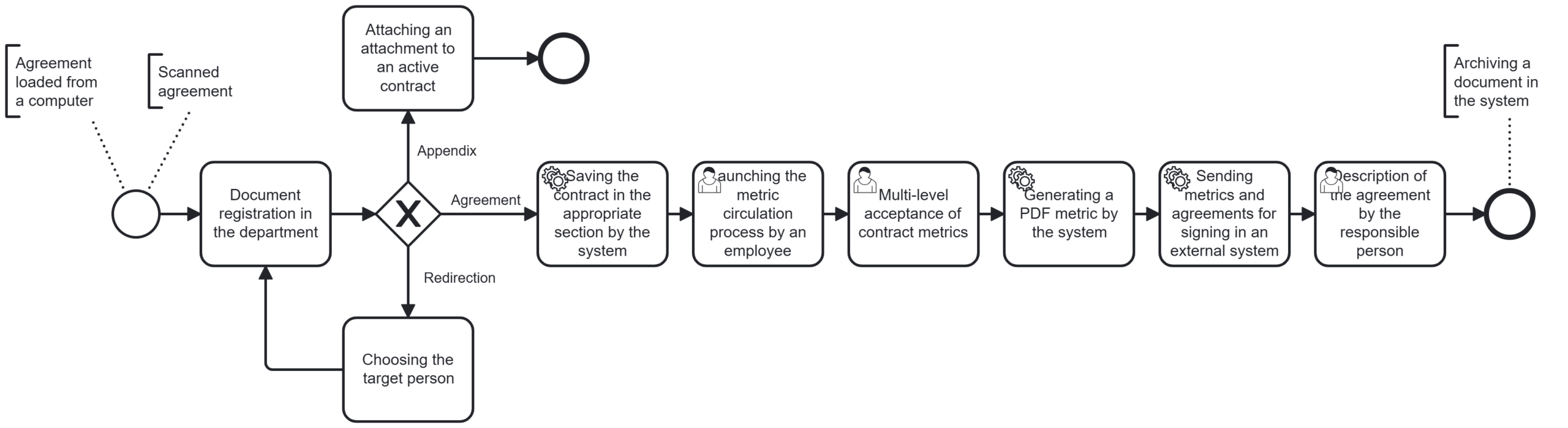
The various stages of the process:
1. Adding a document to the system
The process begins when a document enters the system. Depending on the configuration, multiple input channels can be supported: email, automatic download from network folders, import from a local drive, or dedicated forms. The document is sent to the appropriate department, where it awaits classification. The system records the date of addition, user, and file location, creating the first draft version in the repository.
2. Registration of the document in the department
After adding a document, the user from the responsible department must specify its nature. The system offers three options:
- Marking the document as the main contract – it is necessary to fill in the details: contract type, contractor, number, value, term, responsible department, etc. After saving, the document receives the status ‘Described’.
- Assigning it as an attachment to an existing agreement – a list of existing agreements in the department opens and it is possible to attach it. During registration, it is possible to assign tags, set the confidentiality level and link the document to a specific project or location.
- Redirecting to another person – used when the document has been sent to the wrong recipient.
The system saves this data as document metadata, which enables subsequent filtering, reporting and automatic assignment of the approval path.
3. Indication of persons responsible for acceptance and signature
For the described document, there is a ‘Redirect to signature’ option available, which opens the acceptance form. This is a document containing a tabular list of persons who are to accept and sign the document. The user selects the approvers and signatories, specifying the approval path: sequential or parallel. The selection is made from a list of users assigned to a given department or project.
4. Acceptance of the document
Selected individuals receive document approval tasks in sequence. Each approver has the opportunity to review the content of the agreement, add comments, approve or reject it. The process is carried out electronically in the system, and each decision is recorded and archived. It is possible to define rules: e.g. approval by all or only one person from the group. The approval history is available from the document level.
5. Signing a document in an external system
After accepting the document and the acceptance metric, the system forwards the document to an external platform, e.g. DocuSign. The persons designated as signatories receive e-mails requesting them to provide their electronic signatures. DocuSign ensures compliance with eIDAS regulations and allows both internal personnel and contractors to sign. After signing, the document returns to the system as ‘signed,’ and the PDF version contains visible signature marks.
6. Signature status monitoring
The system automatically monitors the status of the document in DocuSign. Information about who opened and signed the document and when is visible. In case of delays, it is possible to send reminders to selected people. The status is automatically updated on the system side without the need for user intervention. The full event history is available in the system.
7. Description of the agreement once signed
After signing the document, the user can add additional information that was not known at the time of registration. This may include, for example, the contract number assigned by the contractor, the registration number in an external system (ERP, eProcurement), financial terms, settlement details, effective dates, or a description of the subject matter of the contract. This stage allows for the organisation of documentation and ensures that complete data is available for subsequent analysis and reporting.
8. Archiving the contract
The final stage is the permanent archiving of the document. The contract is marked as approved, signed and described, and then sent to a central document repository. At this point, the system blocks further editing of the content or metadata, securing the contract as the final version. The document is sent to the appropriate register with the option of viewing, filtering and reporting. If an expiry date or notice period has been specified in the contract metadata, the system automatically starts monitoring and generating reminders. The archived document remains accessible in accordance with the assigned permissions.
Benefits of implementing the Contract Archive:
- Full compliance with organisational procedures and control of document workflow – the system enables the mapping of existing internal processes, ensuring compliance with company rules and procedures.
- Increased security and transparency of processes – a central repository of contracts eliminates the risk of lost documents, and a detailed history of actions (logs and audits) enables full traceability of operations performed on each document.
- Integration with the DocuSign electronic signature – the system is integrated with the DocuSign platform, allowing the electronic signature to be implemented directly within the process, without having to go outside the system.
- Reduction in the time required for handling and archiving contracts – automated processes significantly reduce the time taken to complete tasks. Handling of multiple documents at the same time and automatic links to metrics and registers speed up daily work.
- Simple and intuitive operation thanks to a structured interface – the module has been designed with the user in mind – graphical tiles, easy filtering of documents and a logical arrangement of processes enable fast and error-free operation.