
Workflow
It is a modern workflow and task automation system designed for scalability, flexibility and full operational control.

What is Workflow?
Workflow is a comprehensive solution supporting the modelling, management and monitoring of document and task flows within an organisation. The system makes it possible to build fully automated processes – from document registration, through acceptance and decrement, to archiving and reporting. All this while maintaining maximum transparency and compliance with established procedures.
Workflow integrates with other systems (ERP, CRM, e-mail, OCR) and ensures full data security through integration with the Keycloak authorisation system and the Alfresco document repository.
Process map:
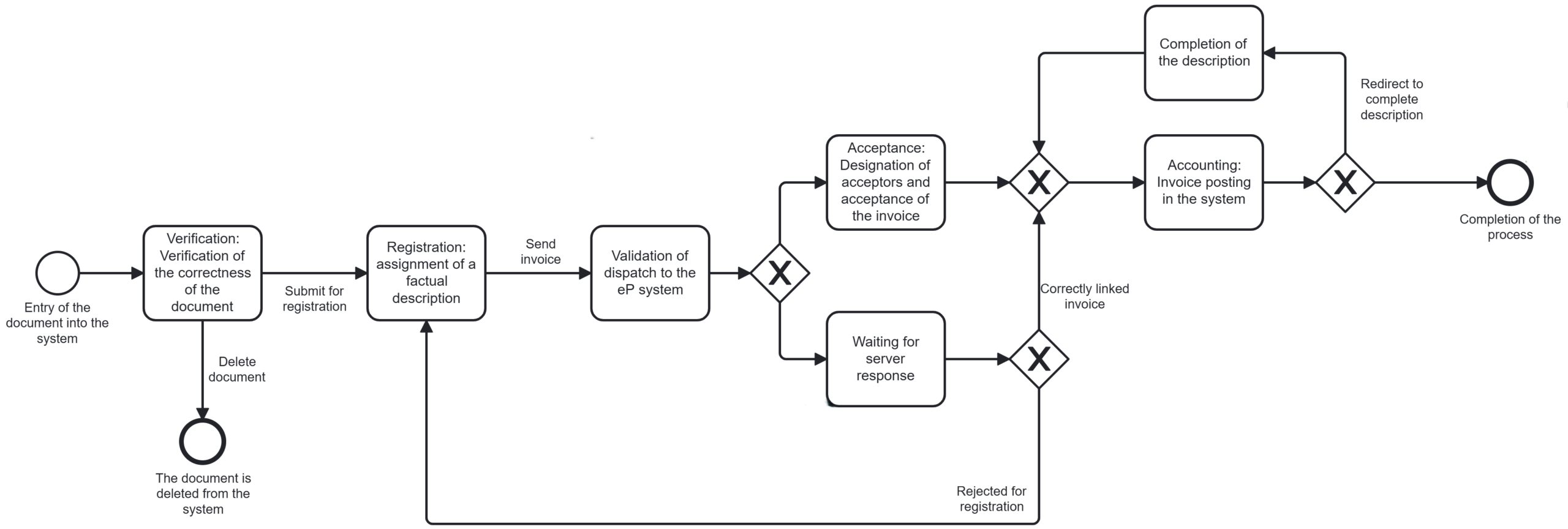
The various stages of the process:
1. Entry of the document into the system
The process starts when a document (e.g. an invoice) is added to the system. This can be done in several ways – manually by the user, automatically through a dedicated email box, or through integration with external systems. Some of the data can be automatically read from the document, speeding up further processing.
2. Verification of the correctness of the document
Once the document appears in the system, the verification stage follows. The user checks whether the document is formally correct – whether it contains all the necessary information, whether it was issued correctly. If the document is incorrect, it may be deleted. If it passes this check, it goes to the next stage.
3. Registration and assignment of a factual description
At this stage, the user fills in data such as: the type of cost, place of cost origin (MPK), amount, source of financing or budget classification. On the basis of these data, the system recognises the type of document (which influences the selection of the appropriate process) and automatically determines the further path of proceedings, including the rules of acceptance.
4. Validation and upload to e-Procurement system
If the document meets the shipping conditions specified in the system (tables), it is automatically transferred to the e-Procurement system(even if it does not contain an order number). For example, if the document is issued to a contractor supported in the eP system and the data is in accordance with the configuration, it goes directly to the order linkage stage. For documents that do not meet the conditions, nor can they be automatically linked to the e-Procurement system, they remain in the Workflow system and are subject to the standard approval path according to the workflow configuration.
5. Acceptance of the document
The system assigns the document to the correct users according to the agreed organisational rules. At this stage, the users perform their tasks – approve the document, enter comments, they can also reject the document with justification or pass it on. The approval path can have one or multiple levels – depending on the document value, MPK or cost type. The system also takes into account substitution rules in case of absence.
6. Posting the invoice in the system
After positive approval, the document goes to the person responsible for accounting. This is where the final check of the financial data and posting takes place. The user can make any accounting corrections and approve the document for onward transmission to the financial and accounting system.
7. Completion of the description
If the document does not contain a full description or requires additional information, the system automatically creates a task to complete the description. It goes to the relevant person who has to add the missing data.
8. Completion of the process and archiving
Once all the required tasks have been completed, the document is marked as completed and archived in the Alfresco repository. The full history of its circulation is recorded in the system, including who, when and what action was taken. The document goes into the repository and is available for viewing by users with the appropriate permissions.
Benefits of implementing Workflow:
- Process automation – automatic assignment of tasks, generation of notifications and conditional decisions eliminates the need for manual handling and significantly reduces process execution time.
- Increased transparency – every stage of the process is accurately recorded and monitorable. Users with the appropriate permissions can see the history of changes, comments, decisions and the current status of the case. This enables better task management and makes it easier to audit activities.
- Scalability and flexibility – Workflow allows for the configuration of many different scenarios. The module easily adapts to the changing needs of the organisation, enabling development and optimisation without the need for programming intervention.
- Improved user experience – users are given clear and specific tasks to perform, and the system interface guides them step-by-step through the required actions. This minimises the risk of mistakes and significantly reduces the time required to handle documents.
- Implementation of substitution functions – the system supports the substitution policy in the event of a user’s absence (e.g. due to holidays), tasks are automatically passed to the designated substitute. As a result, processes are not delayed and the organisation maintains business continuity.